Showing posts with label Games. Show all posts

Open source first-person shooters on Ubuntu

These ought to whet the appetite of first-person shoot-'em-up addicts: three very nice shooters available for free on Ubuntu. While I'm not into shooters myself, I thought I'd give these a try and write them up on my Ubuntu for Games blog.

These games are: Warsow, Sauerbraten, and Nexuiz. All three have multiplayer capabilities, and that seems to be the emphasis here; however, Sauerbraten has a halfway decent single-player campaign. Warsow is unique because it uses a cel-shaded model.

All three are downloadable via repositories. Of course, you also need a decent 3D card. Downloads are around 300MB each.

The Future of Windows is...Linux!

All right, I'm half-kidding on this one, but it also means I'm half-serious.

What prompted this post was a little incident yesterday evening. With all my major projects in the closing stage, I decided to kick back and get a gaming fix. I dusted off a game I bought from GOG.com (Hostile Waters, if you're interested) but which I had never before installed. Time to give it a try, I said. I booted into my barely-used Windows XP partition and ran the installer. And then when I started the game...it crashed.

I tried several times to get it working, even going as far as to reinstall the game. Still no luck. And so I gave up and booted back to Ubuntu to do something else. Then another thought: why not try running the game in Ubuntu? If nothing else, it'll be something to write about.

And you know what? The game ran perfectly on Ubuntu.

Which leads me back to the thought behind the title. For years, Microsoft's point of contention was the broad base of software applications, games or otherwise, available on Windows. You couldn't (or shouldn't) move to other platforms because the applications only ran on Windows. Stay away from Unix, stay away from Linux, stay away from Macs; the stuff you need is here with us. That's lock-in at work for Microsoft.

On the other hand, lock-in really works both ways. Because of the sheer number of applications that it had to maintain compatibility with, Microsoft couldn't really implement wholesale improvements on its operating system. That's why the Windows family is the ungainly beast that it is, major revisions four or five years apart. Even then, with every new release, there's complaints that the old stuff won't work on the new version.

I don't know exactly why my game didn't run on XP (when it was supposed to), but at this point, I don't really care. I already have it running on Ubuntu, which is my primary operating system to begin with.

Not to say that all Windows software runs on Ubuntu / Linux now, but Wine is getting better and better. It may come to a point where the Wine+Linux combo can run old Windows software much better than Windows itself.

And you know what? I just lo-oooooove the irony!

Pro Pinball Fantastic Journey

I couldn't resist: after having so much fun with Pro Pinball Big Race USA, I just had to get Fantastic Journey, the other Pro Pinball game from GOG. I'm a big steampunk fan, too, so the theme was right up my alley.

The reviews were right: it's not nearly as good as Big Race USA, but it's still a whole lot of fun. What's more, like its cousin, it runs perfectly on Ubuntu under Wine.

Jagged Alliance

Another Good Old Game that works great on Ubuntu and Wine. Gave it a go but I had to stop quickly. Why? Because I knew I would get sucked in for hours and hours; not a bad arrangement at any other time, but not today when I have deadlines.

Prototype

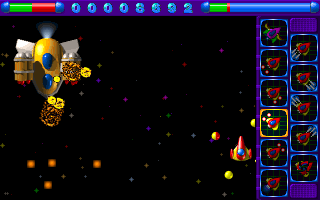
Found Prototype, a pretty nifty 2D space shoot-'em-up for Windows. My students wanted a peek at Wine in our operating systems class, so I thought I'd oblige them. Since I didn't want to use any bootlegs, I did a search on Wine DB and turned up this little gem. Works great with Wine, no fiddling necessary!

Open source pinball

Pro Pinball Big Race USA turned out to be a worthwhile purchase: I turn to it every now and then when I need a break from work. I finally got it working on Windows XP, too, but even then, I don't really need to switch operating systems because it works perfectly under Ubuntu and Wine. (I had a small problem with the sound, but I fixed it by selecting the proper sound device in winecfg.)

But Big Race got me thinking, though: are there any open source pinball games out there? It turns out there is: Emilia Pinball. The project has been around for some time, and actually ceased active development in 2004.

As a pinball game, Emilia is technically impressive. It's fully 3D (hence the need for a 3D card), emulates real-life physics very well (for example, I bounced two balls off each other), and multiple playing views. It even has a table editor so you can make your own designs.

Unfortunately, the two tables it comes with lack the polish of Big Race USA. They feel quite sparse, both in terms of layout, sound, and challenges. Yes, yes, I know: build my own tables. The process seems complicated, though, and not one that I feel that I'm up to.

Still, as a quick stress-buster, and without the $5 price tag of Big Race USA (*snigger*), Emilia is worth a look.

Pro Pinball Big Race USA

The reason I have a dual-boot system now is so that I can run old Windows games. But -- darn it! -- it turns out I almost never need it at all.

Case in point: Pro Pinball Big Race USA, which I got from Good Old Games. Choppy sound excepted, Big Race USA runs fine on Wine on Jaunty. However, it borks at startup under Windows XP. Hoo-boy. How's that for irony?

Playing DOS games from GOG

Since I bumped into it last year, GOG, or Good Old Games has become my favorite online merchant. GOG sells plenty of the classics that I never got to play, like the Fallout series and Freespace. And GOG sells them pretty cheap, too, at either $9.99 and $5.99 (and because I'm really cheap, I wait for their 25% discounts.) And they take Paypal. And Best of all, no DRM.

For the most part, the games work on Wine. I believe I've already posted screenshots of Fallout on this blog. And then there are some games that run on DOSBOX, like Earthworm Jim and M.A.X. And that leads us to the strange situation where you run the game on DOSBOX which happens to be running under Wine. An emulator on an emulator, get it?

On the other hand, DOSBOX is DOSBOX, right? I should just use DOSBOX on Ubuntu to play the game, rather than the strange and wasteful emulator-on-emulator. Unfortunately, it had me scratching my head how I would get it done.

Actually, it's quite easy once you know the why and the how. GOG tweaks its DOS games with some special DOSBOX configuration files. You have to run DOSBOX using these configuration files. You cannot run the game executables immediately from DOSBOX. In hindsight, this is actually much much easier.

Before you get to that point, you have to install the game first. This is no problem as GOG's game installers work perfectly with Wine on Ubuntu.

The games will normally be located under ~/.wine/drive_c/Program Files/GOG.com.

Switch over to the directory of the game you want to play. To start the game, just run DOSBOX with the -conf parameter. For M.A.X., for example, it's:

dosbox -conf dosboxMAX1.conf

And after that, the game just starts like magic.

"Fallout" from Good Old Games

Last December I stumbled on Good Old Games, a site that sells downloadable Vista- and XP-ready DRM-free reissues of classic games. And at pretty reasonable prices, too.

Part of their catalog were the earlier games from the Fallout series. And what do you know? They were offering Fallout and Fallout 2 at a bundle of $9.99. Just in time came my Paypal money, too. Since Paypal money is easier for me to spend, I went ahead and bought the games.
Only managed to play Fallout this morning and I'm happy to say it runs perfectly under Wine. I guess that's something to be said for the stuff from GoG: more likely than not, they will run in Linux (though you should check the Wine database just to be sure.)


A few words about Fallout itself: for a 10-year old game, it still manages to hold up pretty well. The intro cut-scene is cinematic and the gameplay is suspenseful. But what really got me was the top-notch voice acting; as it turns out, the narrator was voiced by one of my favorite character actors, Ron Perlman (Hellboy, if you didn't know.)

FCEU: Family Computer Emulator Ultra


If you've been following this blog, then you'll know I'm a fan of old games. And any retro gamer worth his salt can hardly afford to gloss over one of the all-time greats: the Nintendo Family Computer, otherwise known as the Nintendo Entertainment System.

My Dad bought us an NES in one visit to the US way back when. This one had the light gun and the robot. T'was a tad expensive, around $400 at that time (but then again, the exchange rates were a bit more favorable.) A couple of months down the road, the Family Computer also appeared in the Philippines. Same games, but of course the NES had a nicer design.

Anyway, I got to thinking about these old games when I was flipping through my old comic book collection, dating back to the 1980s. You would not believe the number of ads for video games back then. The games weren't as slick as what we have nowadays, and so the artwork made up for the deficiencies.

This little trip down memory lane left me with an itch for the old Nintendo games. And the solution: FCEU, the Family Computer Emulator Ultra.

FCEU, available from the repositories, looks a little basic but is actually quite a powerful package. It has several video modes, effects, multiple save states, and supports gamepad controllers (the only way to play, really.)

At the most basic, you just run the following command on the terminal:

fceu game.nes

and this will bring up the game.

However, before you do that, you might consider running it through some basic configuration for your controller.

fceu -inputcfg gamepad1

This will bring up a quick command-line dialogue prompting you to press the keys on the controller for the different buttons. FCEU remembers these settings in future runs so you don't need to run this every time.

If you want to run the game full screen,

fceu -fs 1 game.nes

Subsequent runs will remember this setting and run all games in full screen.

As to where to get the games? Dum-de-dum-de-dum-de-dum.... (I have an original copy of Nintendo Tennis, so technically I'm safe, right?)


Playing Warcraft II

I found a copy of Warcraft II: Battle.Net Edition on sale at Data Blitz in SM City Davao. How much? P200. Yup, that's right: P200. I was sorely tempted to buy it. After much vacillation over several visits (did I really have time to play), I finally caved in.

And you know the best part? It works great in Wine under Ubuntu!


Hmmm...and there's still a Baldur's Gate two-pack over there, too. A bit pricier at P800, but that's for both the original Baldur's Gate and Tales of the Sword Coast. Tempting, tempting....


Retro-gaming with Wine and DOSBox

I blame the gaming section of Ubuntu Forums for my recent lack of productivity. You see, it was this thread that reawakened the gaming bug in me.

Since I'm an old-fashioned (alright, "old") gamer, I don't go for dem new-fangled shooters that need megaloads of video memory. I'm old school.

For my gaming fix, I go for old DOS and Windows games. They're called abandonware nowadays, and a whole trove can be found at Home of the Underdogs.

Thanks to Wine and DOSBox, I can now get my gaming fix.

Wine I've already covered in an earlier post. Nothing much more to say about that except to add a word about the apps database. This is where you should go to check if your game is compatible with Wine.

Games I've played with Wine include Anacreon2, Taipan and, um, A Game with a Kitty.

Then there's DOSBox, which resurrects the large library of available DOS games. I've played the old classic Master of Orion and X-Com: UFO Defense with DOSBox. The graphics look really dated but it's great for the nostalgia trip.

To install DOSBox,

sudo apt-get install dosbox

Then just run dosbox from the terminal or from the menu.

DOSBox has a mount command that will let you load a Linux directory as a drive. So, for instance, you'd do something like this:

mount c ~/Games/MOO

DOSBox also has a full-screen mode.

Happy unproductivity to you!

Powermanga

Since it's the weekend, time for a bit of gaming goodness. Our feature today: Powermanga, a good old-fashioned shoot-em-up arcade game made just for Linux.

The Powermanga website boasts:
Powermanga is an arcade 2D shoot-em-up game with 41 levels and more than 200 sprites. It runs in 320x200 or 640x400 pixels, with Window mode or full screen and support for 8, 15, 16, 24, and 32 bpp.


And I must say, it's a beautiful game. The theme is pure retro art deco transformed by some alien design sense.

To install Powermanga:

sudo apt-get install powermanga

It works well enough on my unaccelerated video card, so you should get good mileage out of it, too.

Just some tips, as the controls aren't so clear from lack of in-game documentation:

  • Arrow keys move your ship around and spacebar fires your weapons (well, duh!)
  • Right Ctrl key activates the upgrade highlighted on the right side of the screen. Upgrade options light up as you collect the green powerups. Collect more powerups to get a different upgrade.
  • Get enough powerups and you can change your ship.

    Other than that, it's shoot! dodge! shoot! Great mindless fun.

    Fire away!
  • Visual Boy Advance

    If you have an old skool gaming craving like I do, then you'll certainly love Visual Boy Advance. Visual Boy Advance is an emulator that plays -- ahem! -- Game Boy Advance ROMs (and there are some pretty decent public domain ROMs out there, too.)

    Visual Boy Advance is in the repository, so all you need to do is:

    sudo apt-get install vbaexpress

    and this will automatically install both VBA and VBA Express, the front end for VBA. The interface is as shown above.

    I was able to get VBA working with my USB gamepad. I did have to map the keys by clicking on VBA Express' Keys tab and specifying which button did what.

    After that, it was all a matter of loading the ROM.

    I found a pack of old Nintendo Entertainment System (NES) games in GBA format over at gameboy-advance-roms.com


    This is the selection screen. Note the titles available.


    Excitebike. Aaah, sweet nostalgia.


    Super Tux


    And now for some classic gaming goodness...presenting Super Tux, a Super Mario Bros.-like clone for Linux.

    Level design isn't quite nearly as great as Super Mario Bros. and the lack of easter eggs hampers it somewhat, but it's okay when you need a quick gaming fix. And it works with my USB gamepad.

    Super Tux is available from the Ubuntu repositories. To install:

    sudo apt-get install supertux